
Start with a Microsoft Learn learning path matched to your role, whether that's end-user productivity or admin configuration, and pair it with the free Microsoft 365 basics video training for quick app skills. That combination gets you productive within days rather than weeks. Once the basics stick, layer in hands-on labs and the official exam study guides if certification is the goal.
TL;DR:
- Most individuals can learn Microsoft 365 effectively through free Microsoft Learn modules and bite-sized support videos, especially for task-specific skills.
- Role-specific training needs vary: casual users benefit from short videos, power users require complete learning paths, and admins need instructor-led courses and hands-on labs with prerequisite knowledge.
- The three main certification pathways, MS-900, AB-900, and MS-102, target different experience levels, from broad fundamental understanding to full tenant management and automation.
- Paid training is mainly advantageous if employers fund certification efforts, CPD logging is necessary, or intensive study is needed to meet tight deadlines.
- Combining structured training with practical, real-time tasks, ongoing community support, and tailored onboarding speeds up adoption and reduces support issues in organizations.
Table of Contents
- Where to find the best microsoft 365 training resources
- Which training format suits your role?
- MS-900, AB-900, and MS-102: which certification fits you?
- Free versus paid microsoft 365 courses: what's worth paying for
- An 8 to 12 week microsoft 365 learning plan you can adapt
- Training resources for accessibility and compliance features
- How to build microsoft 365 training into staff onboarding
- Community forums and peer support for microsoft 365 learners
- Publisher perspective: when managed support and training accelerate results
- Get Microsoft 365 training and management sorted together
- Sources
- FAQ
Where to find the best microsoft 365 training resources
Microsoft's own browse hub on Microsoft Learn is the sensible starting point for anyone searching for structured microsoft 365 training. It organises content into role-based learning paths, so a finance assistant and an IT administrator land on completely different modules despite starting from the same page. Filter by role, product, or level, and you'll find collections built specifically for end-user productivity, admin configuration, or admin management.
For a faster, less structured route, Microsoft Support runs basics video training covering Word, Excel, Teams, OneDrive, and SharePoint in short, task-based clips. This is where SharePoint training for beginners genuinely lives. Rather than a theory-heavy course, you get a five-minute video on sharing a file or setting up a Teams channel and you're done.
Three official hubs cover most needs:
- Microsoft Learn browse hub — role-based learning paths and modules, free, self-paced, updated as features change.
- Microsoft Support training centre — bite-sized videos and articles for immediate, task-level questions.
- Exam readiness zones — official study guides for MS-900, AB-900, and MS-102, each listing exam domains, prerequisites, and linked modules.
Bookmark all three. You'll return to different ones depending on whether you're troubleshooting a task today or building toward a credential over the next few months.
Which training format suits your role?
A casual office user opening Excel twice a week has completely different needs from someone configuring conditional access policies for forty employees. Matching training format to role isn't a nice-to-have; Microsoft's own adoption guide treats it as the deciding factor in whether learning actually sticks.
- Casual users do best with short videos and standalone modules, dipping in when a specific task comes up.
- Power users benefit from complete learning paths that build features into a fuller mental model of the app.
- Administrators need instructor-led sessions or structured labs, particularly for PowerShell practice and tenant-wide configuration.
Admin tracks carry real prerequisites. Expect to need working knowledge of DNS, basic identity concepts, and general IT literacy before diving into tenant administration paths. Self-paced modules are flexible but easy to abandon halfway through. Instructor-led courses add structure and accountability but cost more and fix your schedule. Virtual labs sit in between, giving you a sandboxed tenant to break things in safely.
Pro Tip: Combine formats rather than picking one. Watch a short video to understand a concept, then immediately open a free trial tenant and repeat the task yourself. That fifteen minutes of doing cements what the video only showed you.
MS-900, AB-900, and MS-102: which certification fits you?
Three exams dominate the microsoft 365 certification landscape, and each targets a different stage of learning.
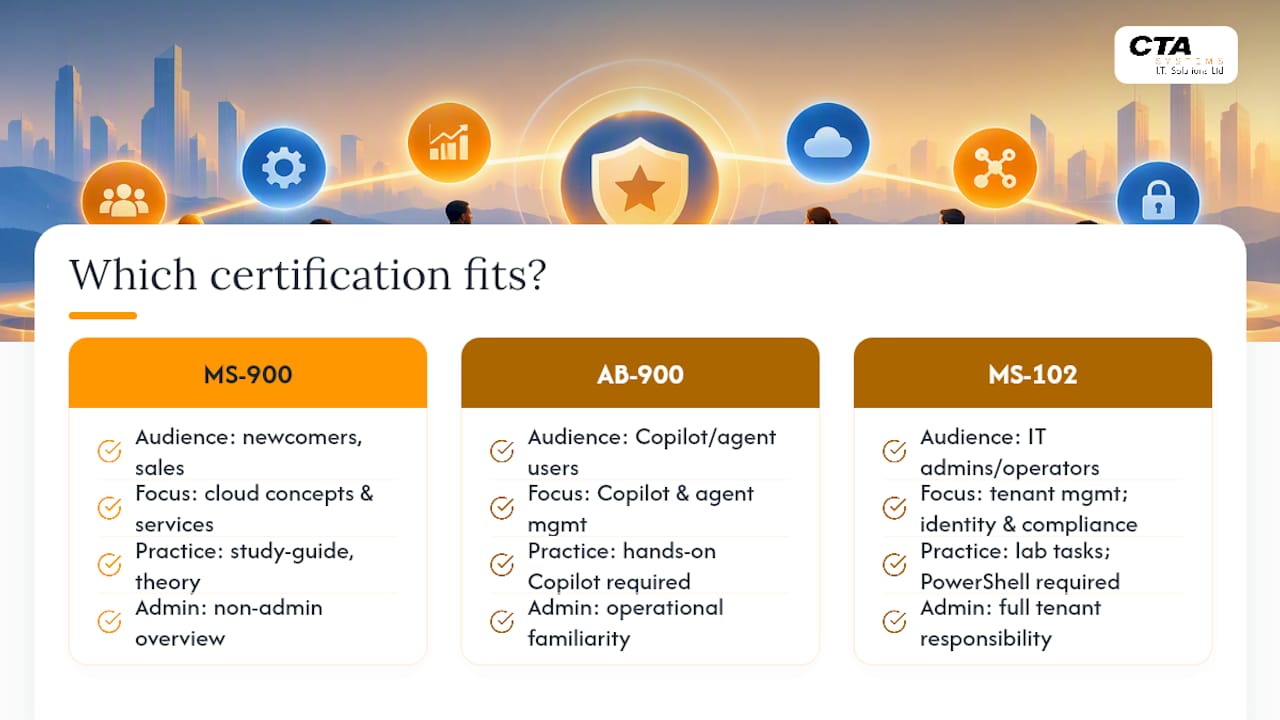
MS-900 (Microsoft 365 Fundamentals) is the entry point, covering cloud concepts, core Microsoft 365 services, security basics, and pricing models. Microsoft's official study guide lays out the exam domains and links straight to the relevant learning modules, so it's a sensible starting reference even before you book the exam. It suits newcomers, sales staff, or anyone needing a broad, non-technical grasp of what Microsoft 365 actually offers.
AB-900 (Copilot and Agent Administration Fundamentals) focuses on the newer territory of Copilot and agent management. Microsoft's study guide for AB-900 recommends genuine hands-on experience with Copilot features alongside the linked documentation, because this exam tests practical familiarity rather than pure theory.
MS-102 (Microsoft 365 Administrator) covers full tenant management: identity, security, compliance, and service health. The MS-102 learning path lists its modules and prerequisites clearly, and lab-style tasks feature heavily. Administrator training here typically splits into configure and manage streams, with service-specific modules (Exchange, Teams, SharePoint) coming before tenant-wide governance topics. PowerShell familiarity isn't optional for this one.
Free versus paid microsoft 365 courses: what's worth paying for
Most people can learn Microsoft 365 to a competent standard without spending a penny. Microsoft Learn, Virtual Training Days, and the official documentation and video libraries cover the vast majority of end-user and admin fundamentals for free.
Paid training earns its place in specific situations:
- Your employer is funding the certification and wants a guaranteed exam date and structured curriculum.
- You need the learning logged as assessed CPD for a professional body.
- You're compressing months of self-paced study into a one-week intensive course ahead of a deadline.
If none of those three apply, start free. Only pay when time pressure or formal accreditation makes it worth the cost.
An 8 to 12 week microsoft 365 learning plan you can adapt
Structure beats intention. Here are two adaptable tracks, each assuming three to five hours a week.
Office user track:
- Weeks 1 to 2: Complete Microsoft Support basics video training for your core apps (Word, Excel, Teams).
- Weeks 3 to 5: Work through one Microsoft Learn end-user productivity path in full.
- Weeks 6 to 8: Build a small real project, a tracked budget, a shared Teams workspace, using new skills.
Aspiring administrator track:
- Weeks 1 to 3: Complete the MS-900 study guide modules for foundational concepts.
- Weeks 4 to 7: Work through the MS-102 learning path, module by module, alongside a free trial tenant.
- Weeks 8 to 10: Run lab tasks covering identity, security baselines, and service configuration.
- Weeks 11 to 12: Sit a practice test and book the exam once consistently scoring well.
Pro Tip: Keep a simple tracker, even a basic spreadsheet, logging which modules you've finished and which lab tasks you've actually run yourself. Passing quizzes proves recall; completing lab tasks proves you can do the job, which is the harder and more valuable measure.
Training resources for accessibility and compliance features
Accessibility and compliance skills are often the most overlooked part of microsoft 365 training, yet they matter for every organisation handling sensitive data or supporting staff with additional needs. Microsoft Learn includes dedicated modules on accessibility checkers in Word and PowerPoint, closed captioning in Teams meetings, and the Immersive Reader across Office apps. These sit inside the same browse hub as general productivity paths, so they're easy to miss unless you search specifically.
Compliance training runs deeper for administrators. Modules covering data loss prevention, retention policies, sensitivity labels, and Microsoft Purview typically appear within admin-focused learning paths rather than end-user ones, reflecting the fact that compliance configuration is usually an IT or governance responsibility rather than something individual staff manage themselves.
For organisations in regulated sectors, treat accessibility and compliance modules as mandatory rather than optional extras bolted onto general training. A finance firm using Microsoft 365 without properly configured retention policies is carrying risk that has nothing to do with how well staff can use Excel. Build both accessibility awareness and compliance configuration into whatever learning plan you follow, rather than treating them as an afterthought once the "real" training finishes.
How to build microsoft 365 training into staff onboarding
New starters absorb far more when Microsoft 365 training is built into onboarding from day one, rather than left to informal peer teaching weeks after they've joined. A structured onboarding sequence typically pairs a short Microsoft Support video session on core apps with a company-specific walkthrough covering internal file structures, SharePoint sites, and Teams channels the new starter will actually use.
The mistake many organisations make is assuming Microsoft 365 fluency because someone used Office at a previous job. Interfaces, security policies, and collaboration norms differ between organisations even when the underlying software is identical. Building a short, standardised checklist, accounts provisioned, MFA configured, a 30-minute walkthrough of shared drives and Teams etiquette, catches gaps that assumption-based onboarding misses entirely.

For growing SMEs, this is where training tends to fall apart without a plan. Onboarding one new starter every few months rarely justifies building formal training materials, yet informal handovers leave gaps that surface as support tickets months later. A short, repeatable microsoft 365 tips checklist, covering file sharing conventions, meeting etiquette in Teams, and where compliance policies apply, closes that gap without demanding a full curriculum. Revisit it whenever Microsoft rolls out a significant feature change, since Microsoft explicitly recommends continuous learning as the platform evolves.
Community forums and peer support for microsoft 365 learners
Self-paced modules answer most questions, but not all of them, and this is where community support genuinely earns its place. The Microsoft Tech Community hosts active forums for Microsoft 365, Teams, SharePoint, and security topics, with real administrators answering configuration questions that official documentation sometimes glosses over.
Reddit communities focused on Microsoft 365 administration and Office 365 also see heavy traffic from IT professionals swapping practical fixes, particularly for licensing quirks and PowerShell scripting problems that rarely make it into official guides. These spaces work best as a supplement to structured learning paths rather than a replacement. A forum thread can solve a specific problem quickly, but it won't teach you the underlying concept the way a Microsoft Learn module does.
For anyone working toward MS-102 or AB-900, study groups organised around specific exam dates offer accountability that self-paced learning often lacks. Setting a shared deadline with even one other learner, and comparing notes on which modules covered which exam domains, tends to keep momentum going through weeks six to eight of any learning plan, which is usually where motivation dips hardest.
Publisher perspective: when managed support and training accelerate results
Small teams rarely have spare hours to learn Microsoft 365 properly while keeping the business running. Combining tenant management with structured staff training, rather than treating them as separate projects, tends to close skills gaps faster because the same team configuring your setup can flag what staff actually need to know. Proactive monitoring, predictable costs, and training tailored to how your business actually uses Microsoft 365 beat sending one person on an isolated course.
— Will
Get Microsoft 365 training and management sorted together
Learning Microsoft 365 properly takes time most SMEs don't have spare, and configuring it correctly takes expertise most internal teams haven't built yet. You can access technicians who understand Microsoft 365 and offer hands-on setup, management, and staff training tailored to your team's needs, rather than generic courses.

The Microsoft 365 service covers setup, ongoing tenant management, and practical training for your staff, all under fixed monthly costs with no hidden extras. This suits SMEs best: businesses that want their Microsoft 365 environment properly configured and their people confident using it, without pulling anyone off their actual job to become an accidental IT administrator. Pair it with a Care Plan for ongoing remote monitoring and proactive issue prevention across your wider IT setup. Get in touch to discuss what your team needs and get a straightforward quote.
FAQ
Is there training for Microsoft 365?
Yes. Microsoft runs official, free training through Microsoft Learn's role-based learning paths and through Microsoft Support's basics video training, covering everything from beginner sharepoint training for beginners to full tenant administration.
Can I teach myself Microsoft 365?
Most people can, using Microsoft Learn modules for structured learning and Microsoft Support videos for quick task-based questions. Administrators aiming for certifications like MS-102 usually add hands-on lab practice, since the MS-102 learning path leans heavily on lab-style tasks rather than theory alone.
Can you learn Microsoft 365 for free?
Yes, entirely. Microsoft Learn, Virtual Training Days, and the Microsoft Support training centre are all free and cover the same content as most paid alternatives. Paid courses only make sense when you need employer-funded certification, formal CPD records, or a compressed timeline.
Does Microsoft offer free training?
Microsoft offers extensive free training through Microsoft Learn's browse hub and Microsoft Support's video library, including the study guides for MS-900 and AB-900. Businesses wanting that training combined with hands-on setup and management can also arrange this through Ctasystems' Microsoft 365 service.