
A WordPress maintenance plan is a paid recurring service that keeps your core software, plugins and themes updated, verifies your backups can actually be restored, and watches your site for security threats and downtime. Anyone running a site that generates leads, sales or bookings needs one; a hobby blog probably doesn't. Expect to pay anywhere from around $50 a month for a basic package to $300 to $1,000-plus for full-service management, according to DreamHost's cost breakdown.
TL;DR:
- The ratio of proactive to reactive work within a maintenance plan is the main driver of cost differences, with proactive tasks including scheduled updates, tested backups, security checks, and performance optimization.
- Business value and site complexity should guide choosing between budget, mid-tier, and premium plans, especially considering the site's traffic, plugin count, and e-commerce functionality.
- Red flags in maintenance providers include reliance on auto-updates without human review, backups stored on the same server, and vague supports for incident response or restore verification.
- Regular maintenance tasks should be scheduled based on site risk, with daily checks for uptime and security, weekly review of malware results, and monthly updates and backups.
- Clear, written guarantees for support response times, backup restore capability, and ownership of incident management are essential before selecting a provider.
Table of Contents
- What does a WordPress maintenance plan actually cover?
- What do WordPress maintenance plans cost at each tier?
- How do you choose the right maintenance plan for your site?
- What should your maintenance checklist look like, and how often?
- Managed WordPress hosting vs a standalone maintenance plan: what's the difference?
- Why trust a specialist to manage your WordPress site
- How often should maintenance tasks actually run?
- What mistakes do buyers make when choosing a maintenance plan?
- What extra services come with premium maintenance plans?
- Marketing traps and how to actually buy sensibly
- How CTA Systems can take website upkeep off your plate
- Sources
- FAQ
What does a WordPress maintenance plan actually cover?
Every credible plan splits its work into two buckets: proactive and reactive. Proactive work happens on a schedule whether or not anything has gone wrong, while reactive support kicks in after something breaks, whether that's a hacked plugin or a checkout page that stopped working overnight. Pantheon's breakdown of what these plans include puts it plainly: the ratio of proactive to reactive work is what actually drives the price difference between providers, far more than any marketing language about "premium" tiers.
The proactive side of a decent plan includes:
- Core, plugin and theme updates applied on a set schedule, not left to auto-update and hope.
- Daily backups with a tested restore process rather than backups nobody has checked will actually recover the site.
- Security monitoring and malware response, including scanning for injected code and cleaning it up when it appears.
- Uptime monitoring with alerts so you know about an outage in minutes, not when a customer emails to complain.
- Performance optimisation, covering caching, image compression and database cleanup.
- Monthly reporting that itemises what was actually done, not a generic "all systems fine" email.
Reactive support is everything else: fixing a plugin conflict that broke the checkout, restoring a hacked site, or troubleshooting a white screen after a rushed update. This is where scope disputes happen, because "support" can mean anything from a five-minute fix to a two-day rebuild, depending on how the contract defines it.
A handful of add-ons change the price sharply enough that you should ask about them before signing anything. Staging environments, where updates run on a copy of the site before touching the live version, add real cost but catch most update disasters before they become customer-facing. Visual regression testing, which automatically screenshots pages before and after an update to flag layout breakage, is rare below the mid tier. WooCommerce checkout testing, essential if you sell anything online, is often a separate line item entirely. And included developer hours, the block of time a provider will spend on custom edits each month, are frequently capped far lower than the word "unlimited" in the sales page suggests.
What do WordPress maintenance plans cost at each tier?
Pricing tends to cluster into three fairly distinct bands, and the jump between them buys you specific, nameable things rather than vague quality improvements.
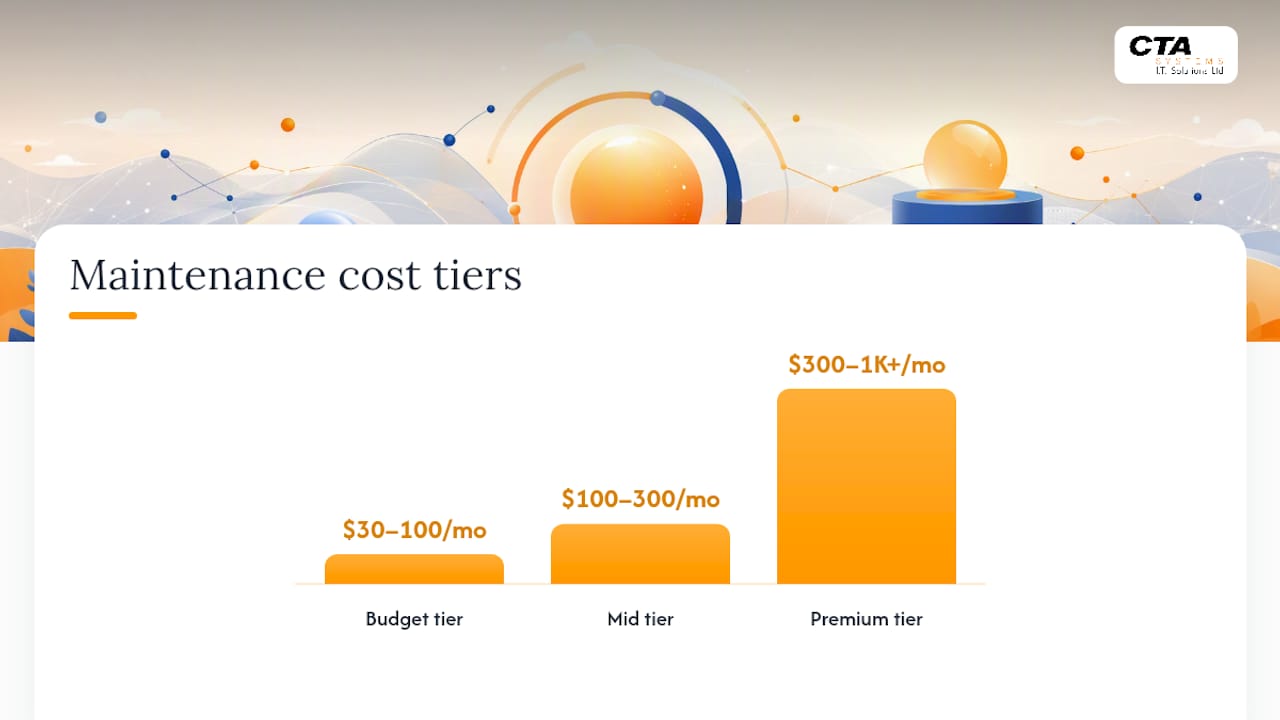
- Budget tier ($30–$100/month): mostly automated. Updates run on autopilot, backups exist but rarely get restore-tested, and human review is minimal or absent. Fine for a brochure site with no transactions.
- Mid tier ($100–$300/month): updates get tested on staging before going live, backups are stored off-site with proper retention, and you get a defined block of support hours plus basic malware removal.
- Premium/enterprise tier ($300–$1,000+/month): dedicated developer hours, visual regression testing, fast incident response service level agreements, and WooCommerce-grade testing for stores where checkout failures cost real money by the hour.
A useful gut check: work out what one hour of downtime costs your business in lost sales or missed leads, then compare that figure to your annual maintenance spend. For most SMEs running a revenue site, that maths alone justifies moving from budget to mid tier, according to Webvibo's comparison of managed hosting options.
Incident work, the reactive category, gets billed one of three ways: included within a monthly hours cap, billed hourly on top of the retainer, or covered entirely under a fixed-fee premium plan. Read the contract for how many hours are included and what the overage rate is, because that number is where budget-tier providers quietly claw back margin.
The maths on outages is worth sitting with for a second. A single ransomware infection or a botched update that takes a store offline for a day can cost more in lost revenue than a full year of mid-tier maintenance. Pantheon's analysis notes that staging-tested updates and guaranteed response times exist specifically to prevent that scenario, not to pad the invoice.
How do you choose the right maintenance plan for your site?
Start with two numbers: what your site is worth to the business, and what an hour of it being broken actually costs you. A five-page brochure site with no forms costs you almost nothing per hour of downtime. A WooCommerce store doing steady daily sales, or a lead-generation site feeding a sales team, costs you real money every hour it's degraded or offline. Multiply that hourly cost by how long a typical fix takes without a plan in place, and you'll usually land on a number that justifies mid-tier spending within the first prevented incident.
Next, map complexity to plan level:
- Count your active plugins. More than 15 to 20 active plugins means more update conflicts and more testing required before each release.
- Check for custom code. A custom theme or bespoke functionality needs a human reviewing updates, not an automated script applying them blind.
- Factor in WooCommerce or any payment processing. Checkout logic breaks in ways generic testing won't catch, so this pushes you toward plans with dedicated e-commerce testing.
- Consider your traffic and uptime sensitivity. A site pulling steady organic traffic or paid ad spend needs faster incident response than a low-traffic internal tool.
Once you know roughly where you sit, hold any provider to a short list of trust signals before signing: staging environments for testing updates, off-site backup retention with a stated recovery time, a named engineer or team you can actually reach, and a monthly report that lists what was done rather than a status badge saying "healthy."
Ask providers directly what counts as an "edit" under their support hours, what their incident response time actually is in writing, and what their rollback policy looks like if an update breaks something. Vague answers to any of those three questions are a red flag worth walking away from.
Pro Tip: Ask a prospective provider to show you a real restore log from another client's site, not a description of their backup process. Anyone can describe a backup system; far fewer can prove they've actually recovered a site from one recently.
Watch for three specific red flags: plans that rely purely on auto-updates with no human checking the result, backups stored on the same server as the live site (useless if that server fails), and "unlimited edits" language with no definition of what an edit actually covers.
What should your maintenance checklist look like, and how often?
A workable cadence breaks into four bands, and most of the daily and weekly work takes minutes rather than hours.
- Daily: check uptime monitoring alerts, run a quick automated security scan, and confirm the previous night's backup completed successfully. Fifteen minutes, or fully automated if you're using monitoring software.
- Weekly: review any flagged login attempts or malware scan results, and spot-check that caching and CDN settings haven't reverted after an update. Twenty to thirty minutes.
- Monthly: apply core, plugin and theme updates, ideally on a staging copy first if the site is business-critical, run a performance audit using WebPageTest to catch speed regressions, and actually restore a backup to confirm it works rather than assuming it does. One to three hours depending on plugin count.
- Quarterly: audit which plugins are still needed and remove abandoned ones, check PHP version compatibility, and run a light accessibility and SEO spot check. Two to four hours.
If the monthly and quarterly work is eating more than half a day of someone's time every month, that's usually the point where outsourcing to a maintenance plan costs less than the internal labour it replaces. Tools like WP-Optimize for database cleanup and Query Monitor for tracing slow queries and PHP errors help shrink the time each monthly session takes, but they don't remove the need for someone to actually review the results.
Managed WordPress hosting vs a standalone maintenance plan: what's the difference?
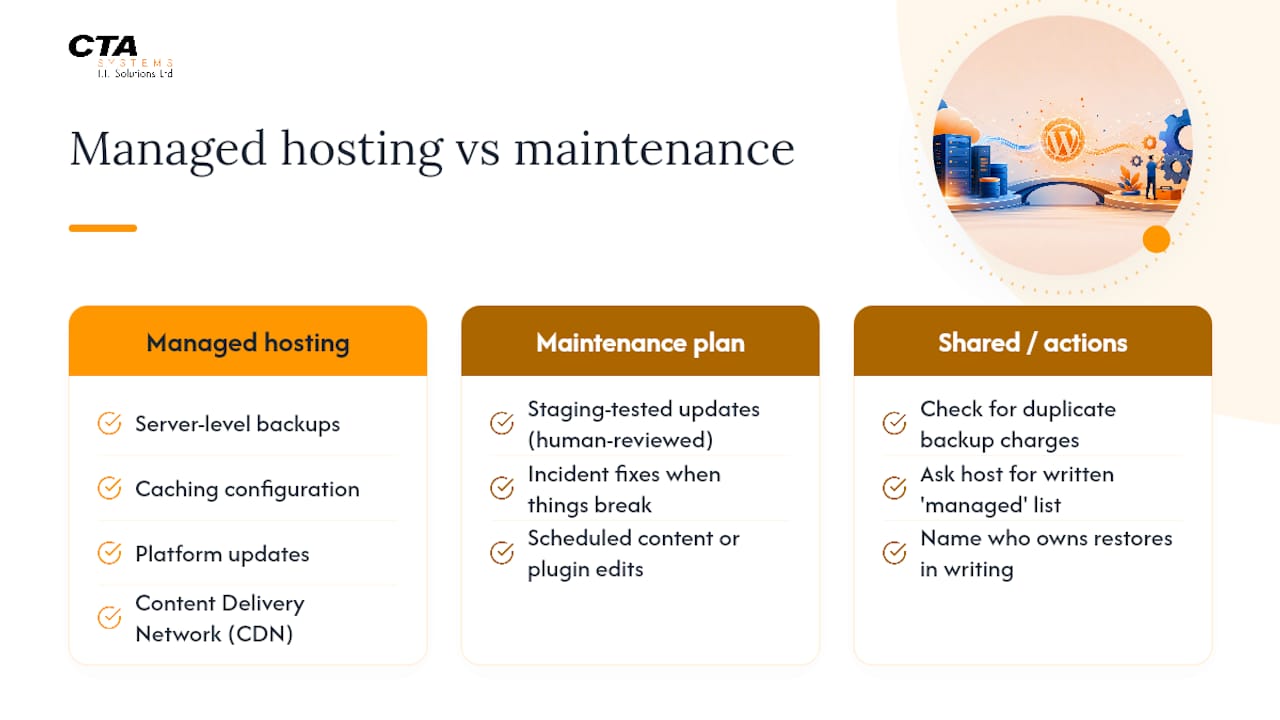
Managed hosting and a maintenance plan overlap just enough to confuse buyers into paying twice for the same thing. Managed hosting typically covers server-level backups, caching configuration, platform updates and a content delivery network, all handled at the infrastructure layer, according to Jetpack's comparison of shared and managed hosting. A maintenance plan adds the human layer on top: staging-tested updates reviewed by a person, incident fixes when something breaks, and scheduled content or plugin edits.
Hosting alone is usually enough for a low-complexity site with few plugins and no custom code, where the host's automated updates rarely cause conflicts. Once you're running WooCommerce, custom functionality, or more than a handful of plugins, you need both: hosting for infrastructure resilience, and a maintenance plan for the judgement calls automation can't make.
The practical fix for avoiding duplicate spend is simple. Ask your host directly for a written list of what "managed" covers on your plan, because the label alone tells you very little, as Pantheon's own analysis of maintenance plans points out. Then check whether your maintenance provider is charging you again for backups your host already runs, and confirm in writing who actually owns the restore process if something goes wrong. Someone needs to be named, not just a support inbox.
Why trust a specialist to manage your WordPress site
Some IT providers have significant experience running IT infrastructure for SMEs, covering managed IT support, remote monitoring and management, cybersecurity and hosting, the same disciplines a proper maintenance plan draws on. The overlap isn't accidental: monitoring for early warning signs, layered security, and predictable monthly billing are exactly the features this article has walked through as the trust signals worth demanding from any provider.
Before you take any provider's word for it, ask three questions: can they show you a recent restore test result rather than describe their backup process in theory, what does their incident response service level actually guarantee in writing, and can they put you in touch with an existing client. A provider confident in its own work answers all three without hesitation.
How often should maintenance tasks actually run?
Frequency should track risk, not a calendar default. A high-traffic WooCommerce store justifies daily backup verification and weekly security scans, because the cost of missing something compounds fast. A low-traffic informational site can often stretch security scans to weekly and still stay safe, provided uptime monitoring runs continuously regardless of site size.
Updates are the trickiest to schedule well. Applying every plugin update the moment it's released sounds responsible but often causes more outages than it prevents, particularly on sites with several interacting plugins. A monthly update window, tested on staging first for anything revenue-critical, catches most conflicts before they reach visitors. The exception is a security patch for a known vulnerability, which should go out immediately regardless of your usual schedule; providers worth using will flag these separately from routine updates.
Reporting cadence matters just as much as task cadence. A monthly report that lists exactly what was updated, what was backed up, and what incidents occurred gives you a paper trail if something goes wrong later. Quarterly deep audits, covering plugin bloat, PHP compatibility and accessibility, catch the slow-drift problems that monthly checklists tend to miss, since nothing looks broken day to day until the site is running twelve plugins nobody remembers installing.
What mistakes do buyers make when choosing a maintenance plan?
The most expensive mistake is buying purely on price without checking what's actually included. A $40 plan that only runs automated updates with no human review looks identical to a $150 plan on a sales page, but the difference shows up the first time an update breaks something and nobody notices for three days.
Trusting the word "unlimited" without a definition is the second common trap. Unlimited edits almost always excludes anything classed as "development work," and providers get to define that line however suits them. Get the definition in writing before you sign, not after your first request gets quoted as an extra.
Assuming backups work because they exist is the third, and probably the costliest. A backup that has never been restored is a hope, not a safeguard. Ask for evidence of a recent, successful restore, not a description of the backup schedule.
Skipping staging for a revenue-generating site is another recurring error, particularly among businesses trying to save money on a mid-tier plan by downgrading to budget features. One broken checkout page during a sale weekend costs more than the staging fee would have across several years.
Finally, plenty of buyers never ask who actually owns incident response outside business hours. If your provider's support only runs 9 to 5 and your site goes down at 11pm on a Saturday, find out what happens before you need to.
What extra services come with premium maintenance plans?
Above the mid tier, providers start bundling services that go beyond keeping the lights on. SEO audits are common, covering technical issues like broken internal links, slow-loading pages and missing metadata, work that overlaps naturally with the performance checks already built into a good plan.
Content updates are another frequent inclusion: minor text changes, image swaps or seasonal banner updates handled within the included support hours rather than billed separately. This matters most for businesses without in-house web staff, where even a simple page edit would otherwise mean hiring outside help each time.
Some premium tiers include conversion-focused extras like A/B testing support or accessibility audits, particularly relevant for e-commerce sites where a small usability fix can measurably affect sales. Visual regression testing, mentioned earlier as a pricing driver, also tends to sit here, screenshotting every page before and after updates so nothing visually breaks without someone noticing first.
The value of these add-ons depends entirely on whether you'd otherwise pay for them separately. If you already have an SEO agency and a content team, a premium plan's bundled versions of those services are redundant. If you don't, the bundling often works out cheaper than buying each piece individually.
Marketing traps and how to actually buy sensibly
Most maintenance plan marketing leans hard on words like "unlimited" and "fully managed" without ever defining what those words exclude. In my view, the label on the tin tells you almost nothing; the only things worth trusting are the specifics you can verify. Ask for a written definition of what counts as an "edit," and ask to see evidence of a recent, successful backup restore, not a description of the backup schedule.
Prioritise staging and restore verification over anything printed on a pricing page. A provider that can show you a real restore log is worth more than one promising "enterprise-grade" security in bold text. And get the service level agreement and monthly reporting commitment in writing before you sign anything, because verbal promises about response times evaporate the first time you actually need them kept.
— Will
How CTA Systems can take website upkeep off your plate
If everything in this guide sounds like a lot to track yourself, that's because it is, and it's exactly the gap CTA Systems' Care Plans are built to close. Rather than juggling separate vendors for updates, backups and security, you get one fixed monthly fee covering proactive monitoring, tested updates and predictable costs with no hidden extras, backed by direct access to technicians who already know your systems.

The individual pieces map directly onto what this guide has covered: Remote Monitoring & Management handles the early-warning detection that catches problems before they become outages, Managed IT Support covers the broader infrastructure your WordPress site sits on, and Web Domains, Hosting & SSL keeps the hosting layer itself properly configured and secure. If you're running Microsoft 365 alongside your website, that's covered too through dedicated Microsoft 365 support.
The sensible next step is a short site audit: get a clear picture of what's currently covered, what's missing, and where you're paying twice for overlapping services. From there, CTA Systems can put together a quoted proposal and handle any migration work needed to bring your site under a single, accountable care plan.
Sources
WebPageTest for speed diagnostics, and WP-Optimize for database cleanup, both let you verify performance claims yourself rather than taking a provider's word for it.
- WordPress maintenance plan — DreamHost
- What WordPress maintenance plans actually include and cost — Pantheon
- Shared hosting vs managed WordPress hosting — Jetpack
- WebPageTest
FAQ
Is WordPress outdated in 2026?
No. WordPress still powers a large share of the web and continues receiving regular core updates, security patches and new features. What's outdated is running it unmaintained, with old plugins and no monitoring, which is precisely what a maintenance plan exists to prevent.
Why are some businesses moving away from WordPress?
Most reported frustration traces back to poor maintenance rather than the platform itself: slow sites from bloated plugins, security breaches from missed updates, or unreliable hosting. Sites on a proper maintenance plan, with staging-tested updates and monitored security, rarely generate the same complaints.
What should a maintenance plan include?
At minimum, expect core, plugin and theme updates, backups with a tested restore process, security monitoring, uptime alerts, performance checks and monthly reporting on what was done, as outlined in Pantheon's breakdown of maintenance plan components. Anything calling itself a maintenance plan without a tested backup restore isn't offering real protection.
How much does WordPress maintenance typically cost?
Basic plans start around $50 to $100 a month, mid-tier plans with staging and human review run $100 to $300, and premium plans with developer hours and fast incident response reach $300 to $1,000 or more, according to DreamHost's pricing guide. CTA Systems' own Care Plans are priced on request based on site complexity and support needs, detailed on the Care Plans page.